
Written by the EasyDone team. Last checked 10 October 2026.
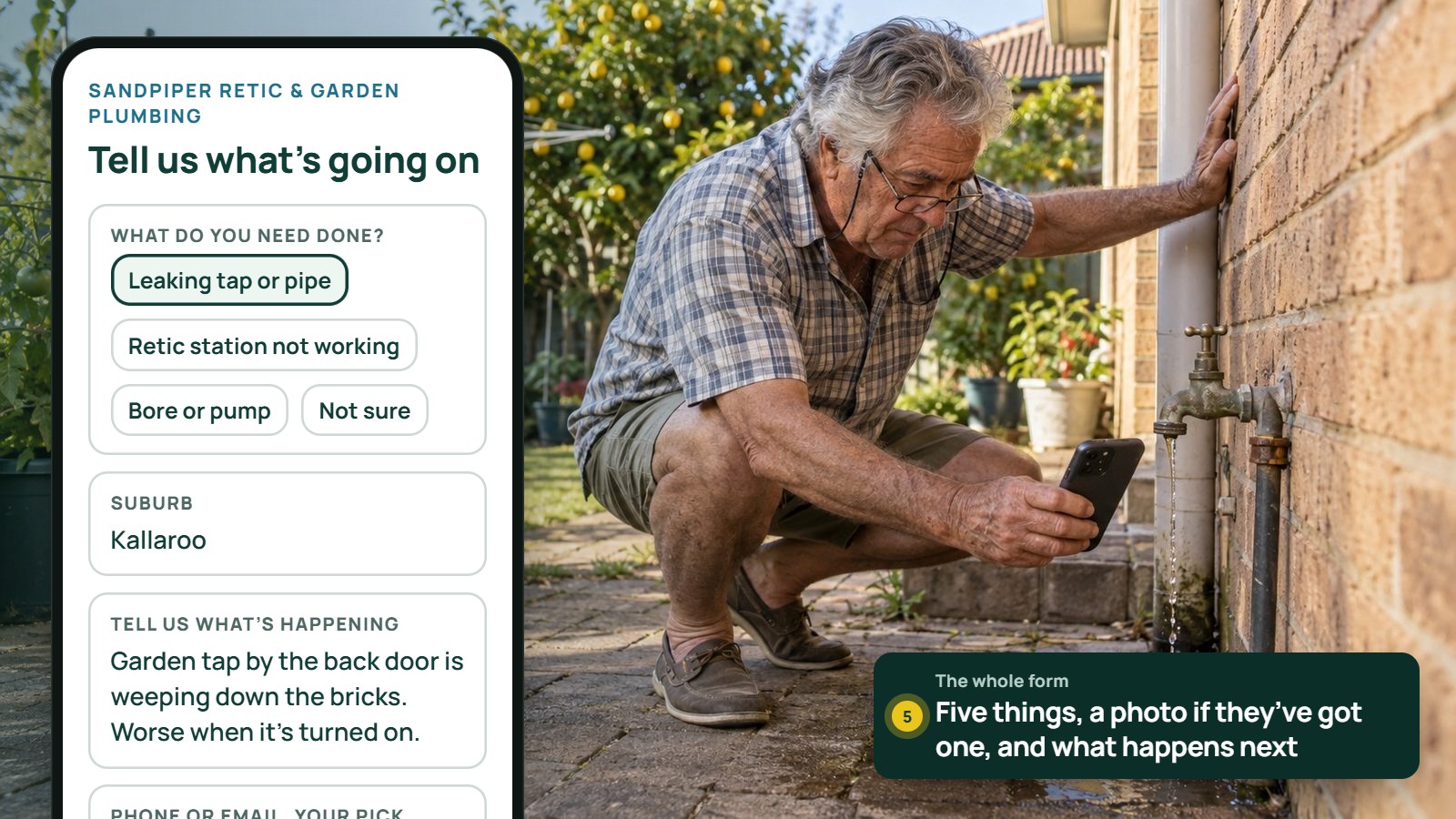
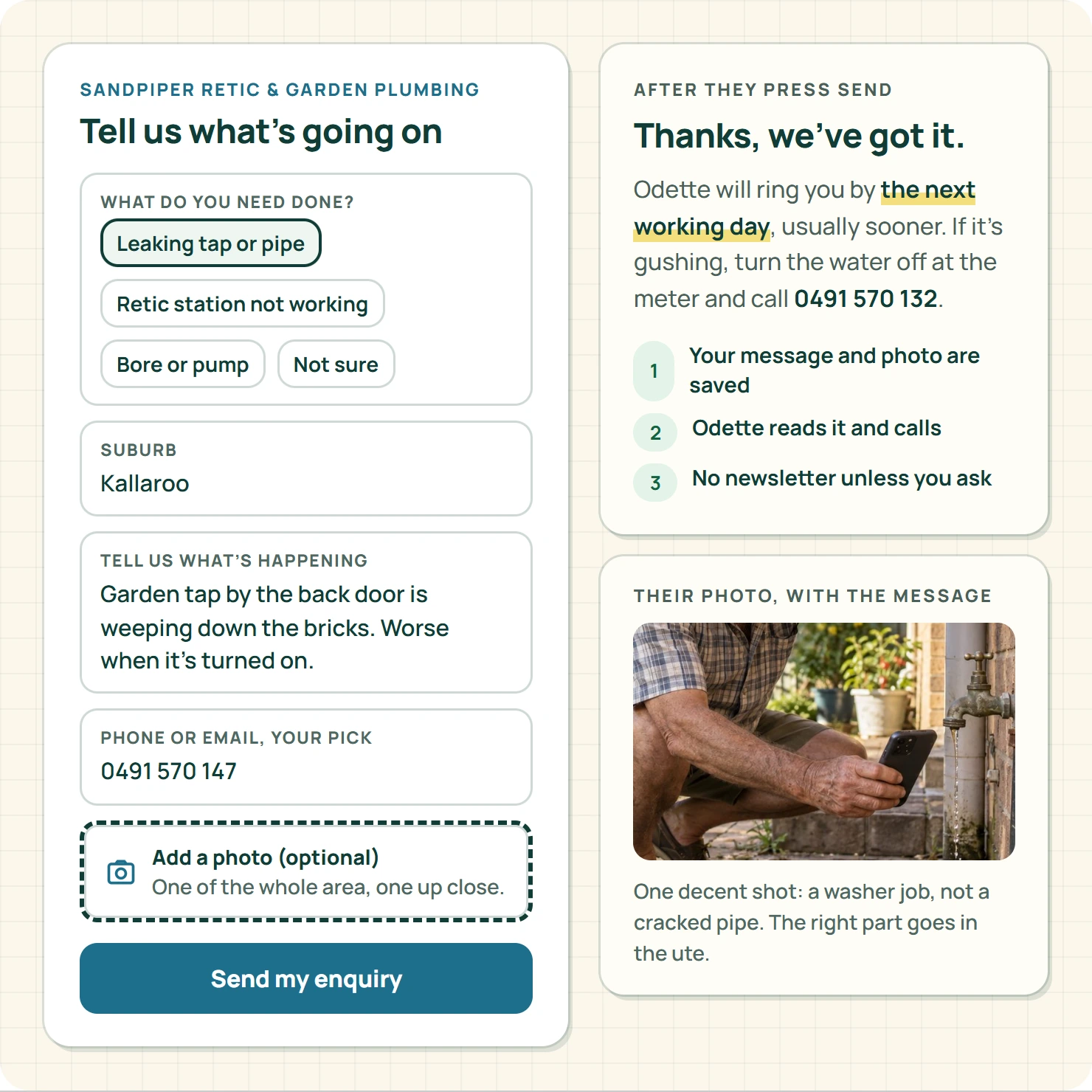
Five things. What they need done, their suburb, a few lines in their own words, one way to reply, and a photo if they've got one handy. Then tell them, in plain words, exactly what happens after they press send.
That's the whole form. Everything else can wait for the phone call.
The rest of this is the seven ways trade businesses stuff it up, and the fix for each one. To keep it real we'll follow a made-up business: Sandpiper Retic & Garden Plumbing in Joondalup, run by Odette Hollway. Odette's customers are mostly retirees in Heathridge, Kallaroo and Mullaloo with a dripping garden tap, a station that won't fire or a bore that's started painting the footpath orange.
Her old form had eleven fields, two of them dropdowns with twenty options each. She was getting about one enquiry a week from it, and the people who did fill it in usually rang her anyway to "make sure it went through".
The form, in one table
Print this, hand it to whoever looks after your website, and you're most of the way there.
| Field | Ask it on the form? | Why |
|---|---|---|
| What do you need done? | Yes: a short list plus "Not sure" | Tells you if it's your kind of work |
| Suburb | Yes | Tells you if it's your patch |
| Tell us what's happening | Yes: a few lines | The detail you'll actually use |
| Phone or email | Yes: one of them, their pick | You need one way to reply, not two |
| Photo | Optional, with a hint | Sometimes saves a site visit |
| Full street address | Later | Needed for the booking, not the first chat |
| Budget | Usually not | Nobody knows their budget for a dead solenoid |
| How did you hear about us? | No | Nice for you, a chore for them |
| Preferred day and time | Only if you really book from it | Otherwise it's a promise you can't keep |
Verdict: five fields in, a photo optional, everything else moved to the call.
Mistake 1: asking the customer to diagnose the job
Your customer doesn't know if it's the solenoid, the controller or a cracked lateral under the lawn. Working that out is literally what they're paying you for. A dropdown that says "Valve replacement / Controller fault / Pipe repair / Pump service" asks them to do your job before you've said g'day.
Give them a short list in their words instead: "Leaking tap or pipe", "Retic not working", "Bore or pump", "New garden or retic install", and the most important option on the page, "Not sure, here's what's happening".
W3C's forms guidance says every field needs a clear label and instructions where people need them.1 So write "What would you like done?" and "Your suburb", not "Service category" and "Location code". If a label only makes sense inside your office, it's the wrong label.
Mistake 2: making every field compulsory
Ask yourself what each answer changes. If a field doesn't change whether you take the job, where you go, or how you reply, it's not compulsory. Most of them aren't.
Odette's old form demanded both a phone number and an email. Her customers are retirees: half of them don't check email, and the other half won't give a stranger their mobile on the first date. Now it's "How should we get back to you?" with phone or email, their pick, and only one is required.
Mark the optional fields as optional, right there in the label. A customer shouldn't have to press Send three times to find out which boxes your website cares about.
Mistake 3: error messages that blame the customer
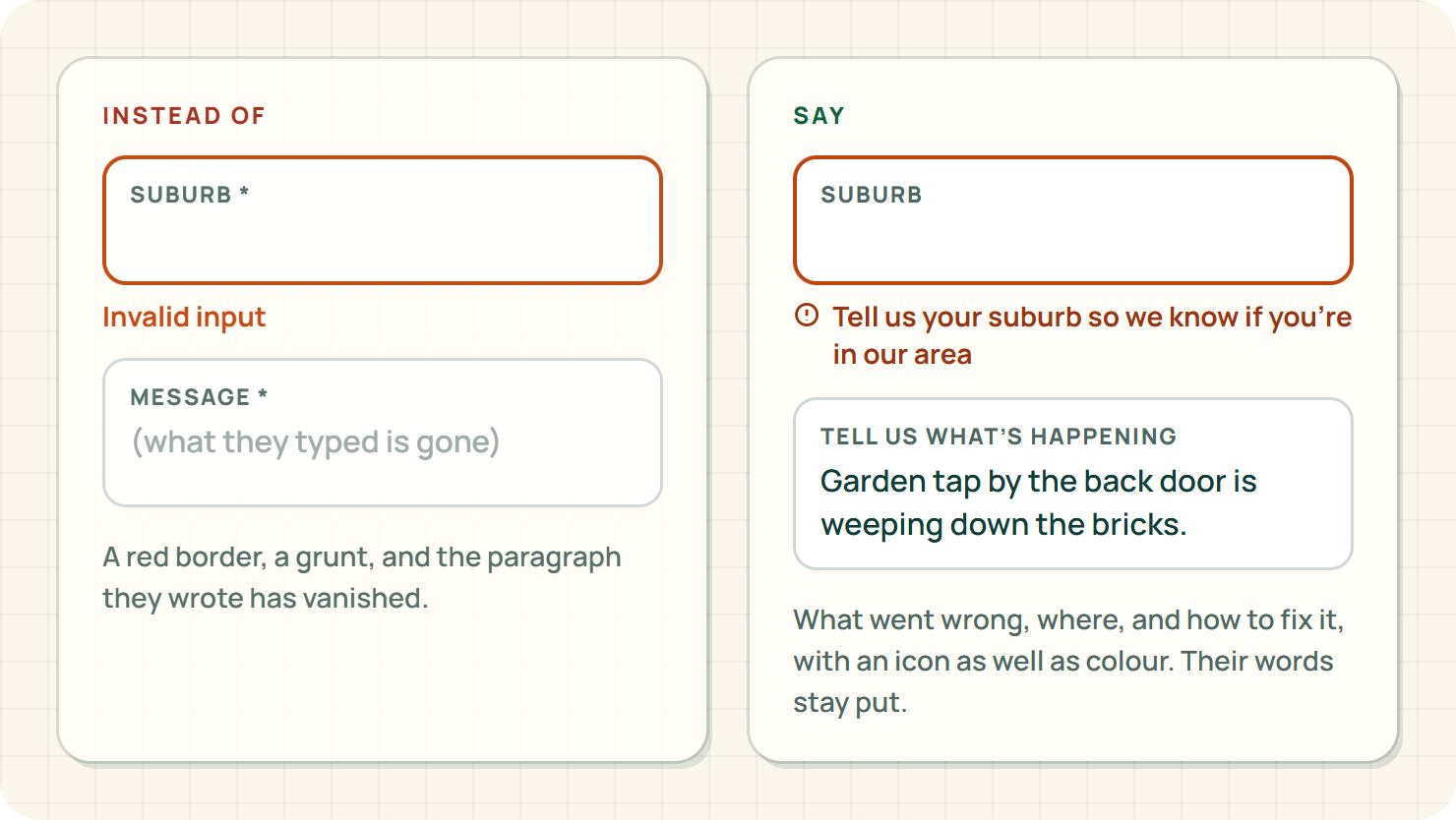
"Invalid input" is the website version of a grunt. W3C's guidance on form notifications is simple: tell people what went wrong, where, and how to fix it, and tell them clearly when it worked.2
| Instead of | Say |
|---|---|
| Invalid input | Enter a phone number or an email so we can reply |
| Field required | Tell us your suburb so we know if you're in our area |
| Upload failed | That photo's too big. Try a smaller one, or send it later by text |
Two more rules. Keep everything they've already typed when an error pops up, because nothing sends a 74-year-old back to the Yellow Pages faster than losing a paragraph. And don't rely on a red border alone: W3C's design tips say to use more than colour to show what's wrong.3 Plenty of blokes can't tell red from green, and the sun on a phone screen at the back fence doesn't help.
Mistake 4: a photo upload that eats the message
A photo is gold. Odette can tell from one decent shot whether a leaking tap is a ten-minute washer job or a cracked pipe in the wall, and she can bring the right part the first time.
So ask for it nicely, and say what helps: "One photo of the whole area and one close-up of the problem is perfect." Never ask anyone to dig up a pipe, open a meter box or climb onto anything for a picture.
Then make the photo optional, and give a way round it: "No photo? No worries, we can sort that when we ring." If an upload fails, the message they wrote must still be there.
One privacy note. The OAIC says a photo of an identifiable person can be personal information.4 Add a light line under the upload: "Please keep people, paperwork and house numbers out of shot." Customers appreciate being asked, and you don't end up storing pictures of the grandkids.
Mistake 5: a thank-you page that promises what you can't do
"Your booking is confirmed!" when it's really a request. "We'll call within the hour!" when you're on a roof in Ocean Reef until three. The ACCC is clear that business claims mustn't mislead,5 and the button, the thank-you page and the reply email are all claims.
Write what's actually true. Odette's now says: "Thanks. Odette reads every enquiry before 5 pm on weekdays and rings or emails back by the next working day. If water's going everywhere, turn it off at the meter and ring us on the number above."
Same for the button. "Send my enquiry" is honest. "Book now" isn't, unless it really books.
Mistake 6: sneaking people onto the newsletter
Asking about one garden tap isn't asking for your spring retic specials every month until the heat death of the universe. ACMA says commercial messages need consent, and you need to be able to show you've got it.6
If you want to offer updates, make it a separate box, unticked, with a plain line about what they're signing up for. Plenty of people will tick it if the updates are useful. Nobody likes discovering they were signed up behind their back.
Mistake 7: never testing it end to end
Most broken forms aren't broken on the page. They're broken after it: the email goes to an inbox nobody reads, or into spam, or to the apprentice who left in March. Run this test once a quarter, on your phone, in the car park, on mobile data:
- Send a test enquiry with "TEST" in the message.
- Try to send it with a field missing, then fix it. Did your words survive?
- Attach a big photo straight off the camera. Does it go, or tell you why not?
- Check where it landed, and who saw it.
- Time how long it took a real person to notice it.
- Ask someone who's never seen your site what they think happens next.
Our phone website check goes deeper on the small-screen side, and the enquiry follow-through guide covers what the office does once it lands.
Where EasyDone Studio comes in
Yeah, we make EasyDone Studio, so we're biased. Here's why we reckon it fits Odette's problem.
Studio builds your website from your business details, then every page, word and photo is yours to edit, on every plan, Free included.7 So when the thank-you page needs to say "next working day" instead of "within the hour", that's a two-minute job from the couch, not a ticket to an agency and a fortnight's wait.
Website Plus adds AI help rewriting what's already on your site.7 Odette typed "make my quote page shorter and plainer for retirees" and got back a page that sounds like her on a good day.
Growth adds visual automation workflows and follow-ups, and AI-written customer emails.7 That's the bit that matters after the form. The enquiry gets a prompt, honest first reply, and if the customer goes quiet, a friendly follow-up a few days later. You choose whether each one just goes, or waits for your OK first.
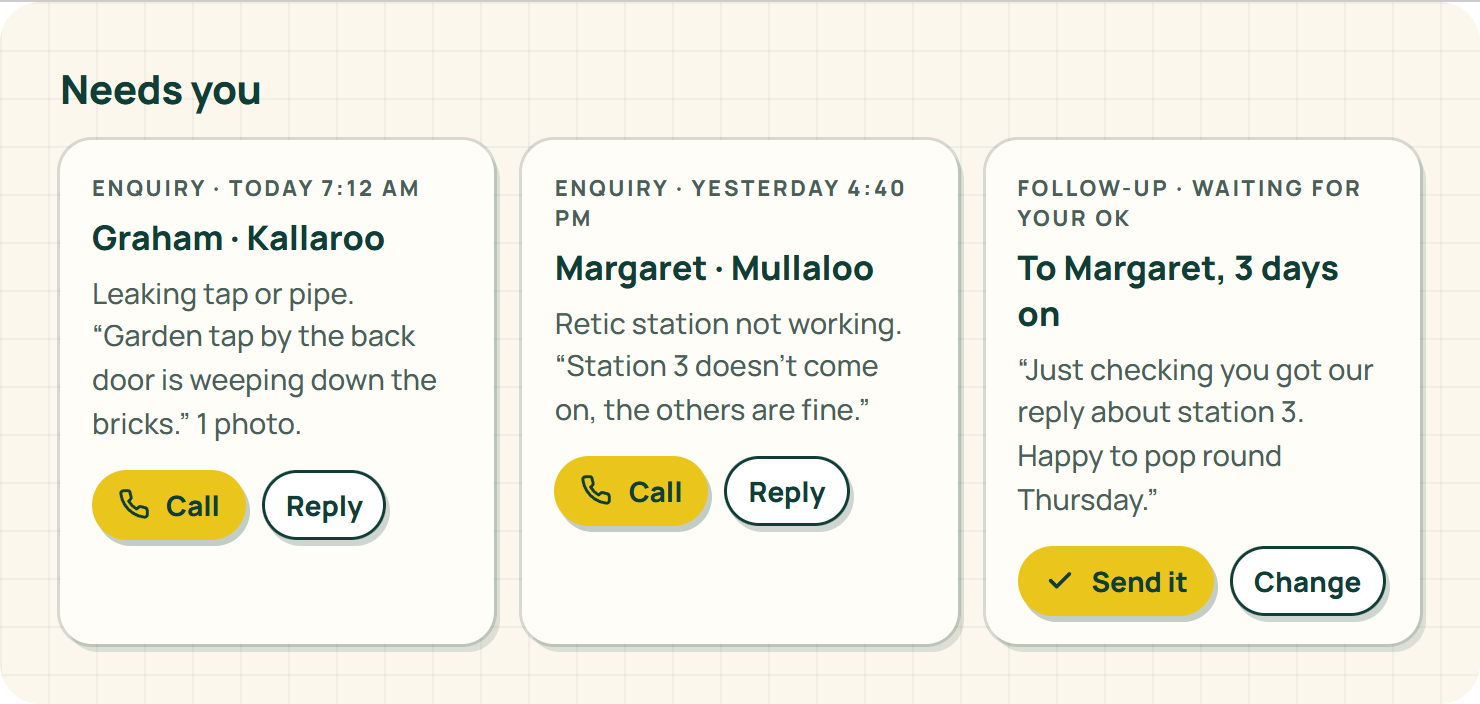
One honest limit: Studio writes the follow-up for you, but the quote that wins the job is still yours to give.
What's in each plan is on the pricing page, in plain numbers.
So how did Odette go?
She cut the form to five fields and a photo, changed the button to "Send my enquiry", rewrote the thank-you page so it stopped promising the impossible, and took the newsletter box off entirely until she's got something worth sending.
The first enquiry through the new form came from a bloke in Kallaroo with a photo of his garden tap weeping down the brickwork. Odette could see it was the jumper valve, not the pipe, so she quoted it over the phone, turned up with the right washer and was back in the ute in twenty minutes.
He didn't ring to check it went through. The thank-you page had already told him what would happen.
Your turn
Open your own website on your phone, right now, and fill in your form like a customer would. Count the fields. Read the thank-you page out loud. If either makes you wince, fix those two things today.
And if your website is making it harder than it should be, see what EasyDone Studio builds for your business: your services, your suburbs, and a form your customers can actually finish.
Sources
- w3.org: W3C: Accessible forms accessed Saturday 10 October 2026
- w3.org: W3C: Form notifications accessed Saturday 10 October 2026
- w3.org: W3C: Designing for accessibility accessed Saturday 10 October 2026
- oaic.gov.au: OAIC: Posting photos and videos accessed Saturday 10 October 2026
- accc.gov.au: ACCC: False or misleading claims accessed Saturday 10 October 2026
- acma.gov.au: ACMA: Avoid sending spam accessed Saturday 10 October 2026
- Plan inclusions verified against the nominated local website CONTENT.md: EasyDone Studio: Plan inclusions accessed Saturday 10 October 2026
Researched and written with AI for EasyDone Studio. Every figure links to the source it came from.