

Written by the EasyDone team. Last checked 10 October 2026.
Google doesn't take your website's word for it. Neither do the AI assistants your customers are starting to ask. They read your website, your Google profile, the directories you signed up to in 2017 and the Facebook page your cousin made, and they compare notes. When the notes disagree, you look less like a business and more like a rumour.
So the details have to match: your business name, phone number, where you're based, where you work, when you answer, and what you do. Line those up everywhere once, keep a single source of truth, and most of this job is done.
Here's what's going on behind the scenes, and how to sort it in an afternoon.
Meet the sparky
Faisal Haddad runs Helena Valley Electrical out of Midland: himself, two electricians, an apprentice and a lot of switchboard upgrades in Swan View, Stratton and Guildford. Until two years ago he traded as "FH Electrical Services", worked out of Bellevue, and did after-hours emergency callouts.
Now he's in Midland, he's got a new name, and he's stopped doing midnight callouts because he's got a toddler and he likes sleeping. The internet hasn't caught up. Search for him and you'll find three phone numbers, two business names, two suburbs, and a directory listing that promises "24/7 emergency electrician" in big red letters.
He found out when a bloke rang his old mobile, now his wife's, at 2 am about a tripped safety switch.
Behind the scenes: who reads what
There are five places your business details live, and they're read by different things.
| Where | Who reads it | What goes wrong |
|---|---|---|
| Your website's pages | Customers, Google, AI assistants | Old number in the footer of a three-year-old article |
| Structured data on your website | Google and other machines | Still describes the old business, because nobody knew it was there |
| Google Business Profile | Customers on Maps and in search | Hours that don't match the website |
| Directories and social pages | Customers, and machines checking you exist | "24/7 emergency" from a previous life |
| AI assistants | Your customers, asking a question | They repeat whatever they found most often |
Google says local results come down to relevance, distance and prominence, and that complete, accurate information helps.1 That last row is the new one. An assistant asked "who's a good electrician in Midland who does switchboards?" pulls from the same places. If half of them say Bellevue and emergencies, that's what it'll tell people.
Step 1: write the fact sheet
One page. These are the facts every listing, page and description must agree with. Faisal's looks like this:
| Fact | Faisal's answer |
|---|---|
| Business name customers know | Helena Valley Electrical |
| Phone | One number, the office mobile |
| Email and website | The business ones, not a personal Gmail |
| Based in | Midland, no shopfront |
| Works in | Midland, Swan View, Stratton, Guildford, Bellevue, Jane Brook, Helena Valley |
| Hours someone answers | Weekdays 7 till 4 |
| Emergencies | No after-hours callouts |
| Services | Switchboard upgrades, renovations, lighting, smoke alarms, EV chargers |
| Who can change these facts | Faisal |
That last line matters. When the office manager wants to add Ellenbrook because one job came from there, the fact sheet says who decides.
Google's guidelines are clear that your listing should use your real-world business name and represent the business as it actually operates.2 So the fact sheet is the truth, not the marketing version of the truth.
Step 2: hunt down the contradictions
Twenty minutes with a cuppa. Search Google for your old phone number in quote marks. Then your old business name. Then your old suburb plus your trade. Every result that isn't right goes on a list with its link and what it should say.
Then do the same on your own website. Old numbers hide in footers, in a "Contact us" line at the bottom of old articles, in a PDF price list from 2022 and in the email signature someone pasted into a page. Faisal found his old Bellevue address on four pages of his own site.
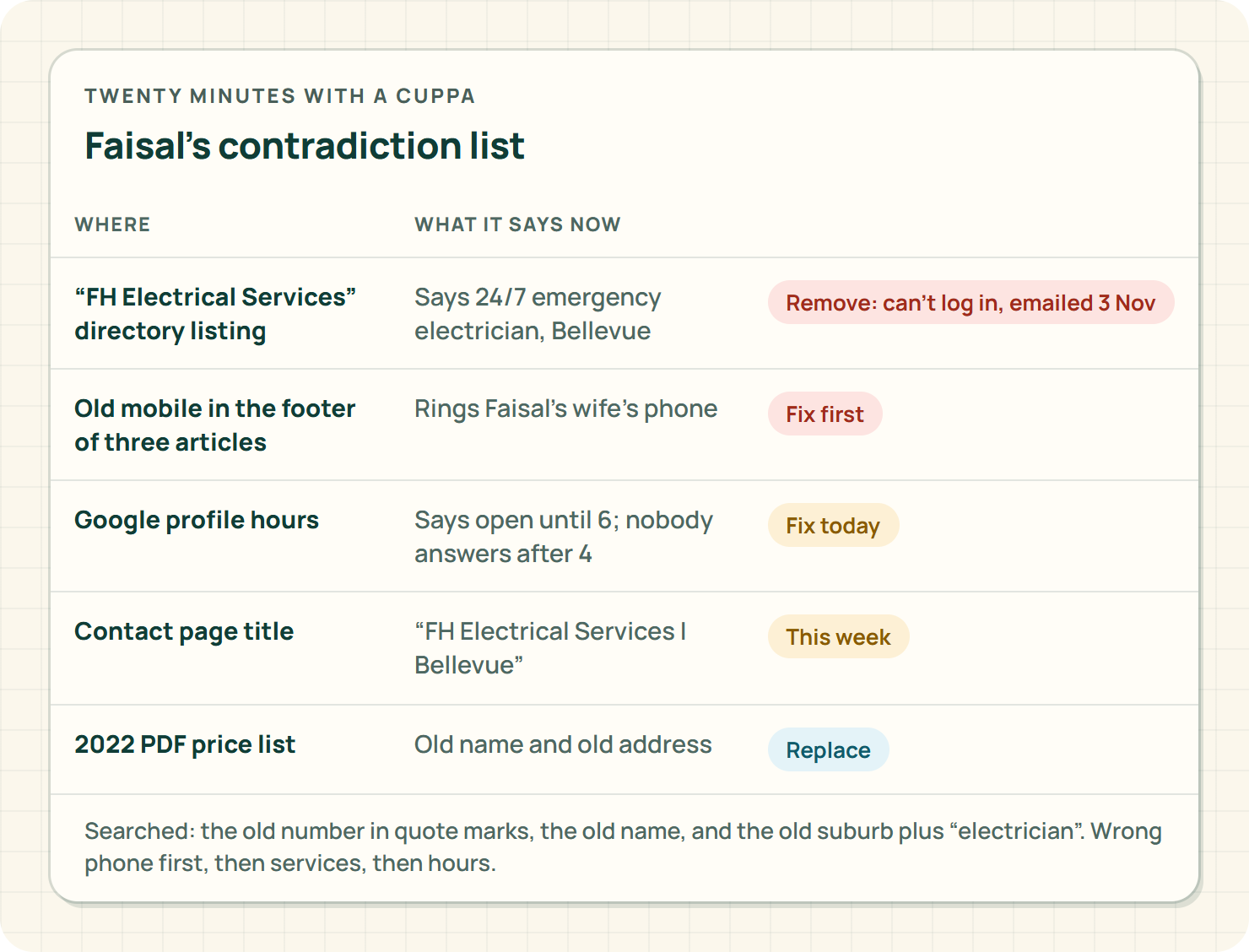
Fix the worst first: wrong phone, wrong services, wrong hours, then everything else.
Step 3: get the Google profile right
Google treats a business customers visit differently from one that goes to the customer, and gives service-area businesses their own settings.3 Faisal goes to the customer, so his profile shows his service area and hides his street address. Nobody needs to rock up to his garage.
Set the hours to when someone actually answers. If you've stopped emergency work, the profile, the website and every directory need to stop saying you do it, all on the same day.
Step 4: check the description the machines read
This is the part most owners have never heard of. Behind your website's pages there can be structured data: a tidy, machine-readable description of your business. Google's documentation for local businesses lists the business name and address as required, and things like phone, hours and website as recommended.4
You don't need to read code. You need to ask whoever looks after your website three questions:
- Do we have structured data describing the business?
- What does it say our name, phone, hours and location are?
- Does it match the fact sheet?
Faisal's website person found it still described "FH Electrical Services, Bellevue, open 24 hours". It had been added by a plugin years ago and nobody had looked at it since.
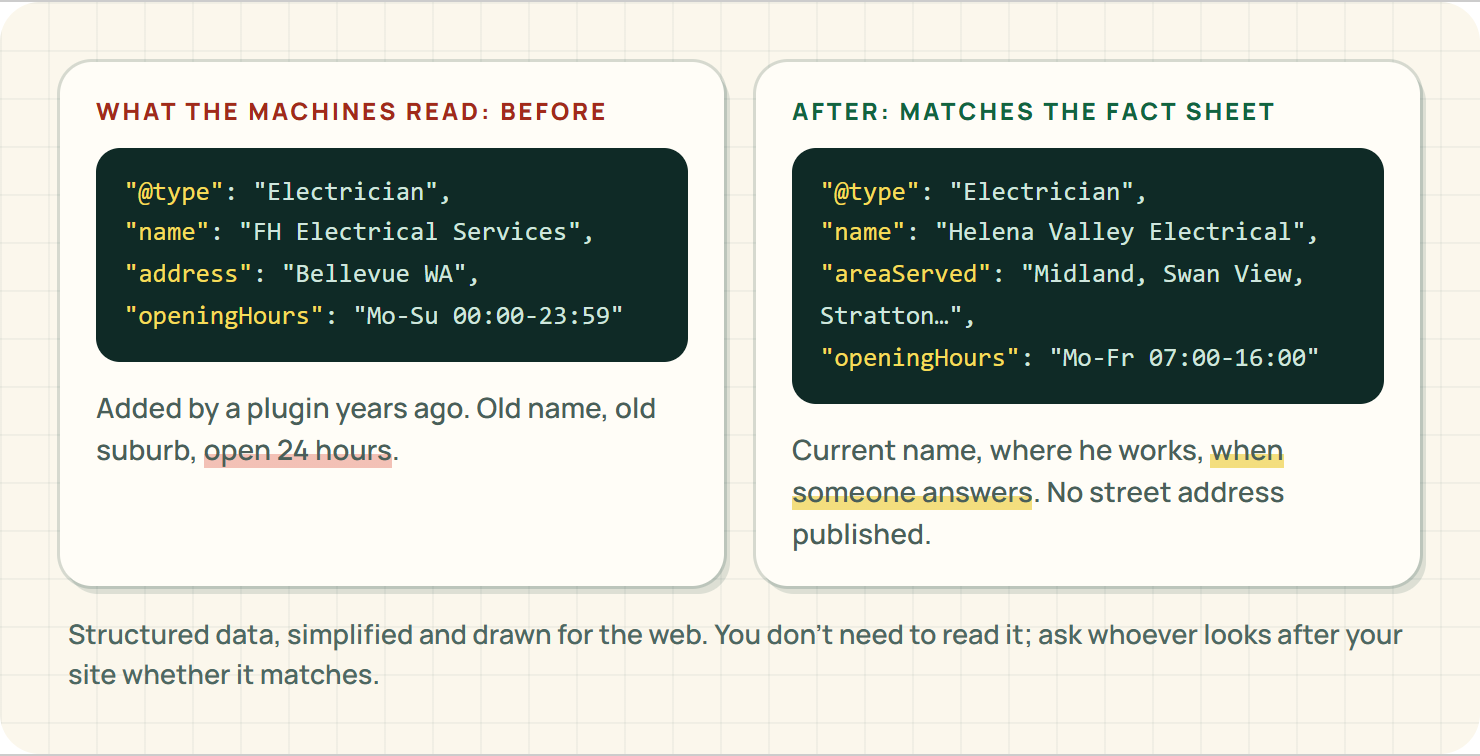
Two rules from Google's general guidelines for structured data are worth knowing: it should describe what's actually on the page, and it shouldn't be misleading.5 So no made-up star ratings, no shopfront you don't have, and no services you've stopped doing. And if you hide your street address on Google, talk through with your website person how the address is handled here, rather than letting a plugin publish it by default.
What about all those directories?
You don't need to be on every directory on the internet. You need the ones you're on to be right. Sort them into three piles:
- Ones that send you work. Keep them, log in, fix them against the fact sheet, and put the login somewhere the business can find it.
- Ones you can log into but never get work from. Fix them anyway, it takes five minutes each, or close them if they'll let you.
- Ones you can't log into any more. Use the directory's own "claim this listing" or contact form to fix or remove them. Write down the date you asked.
Faisal had seven listings. Two sent him work, three he could fix, and two belonged to a version of the business that no longer exists. The two he couldn't get into took a couple of emails and a few weeks, but they came down.
Don't pay anyone to "submit you to two hundred directories". More listings means more places to go stale, and stale listings are exactly the problem you're fixing.
Step 5: temporary changes, done properly
Christmas, Easter, the fortnight you're in Bali. Google has special-hours settings for exactly this.6 Use them, put the same notice on your website, and give one person the job of taking both down afterwards.
A Christmas closure notice still up in March doesn't just look sloppy. It's one more contradiction for the machines to chew on.
Step 6: make your page titles say who you are now
Google builds the blue link in search results mostly from your page titles.7 If your contact page title still says "FH Electrical Services | Bellevue", that's what people see. Update the titles on the home page, contact page and service pages to the current name and the area you work in.
Where EasyDone Studio comes in
Yeah, we make EasyDone Studio, so we're biased. Here's why we reckon it fits this job.
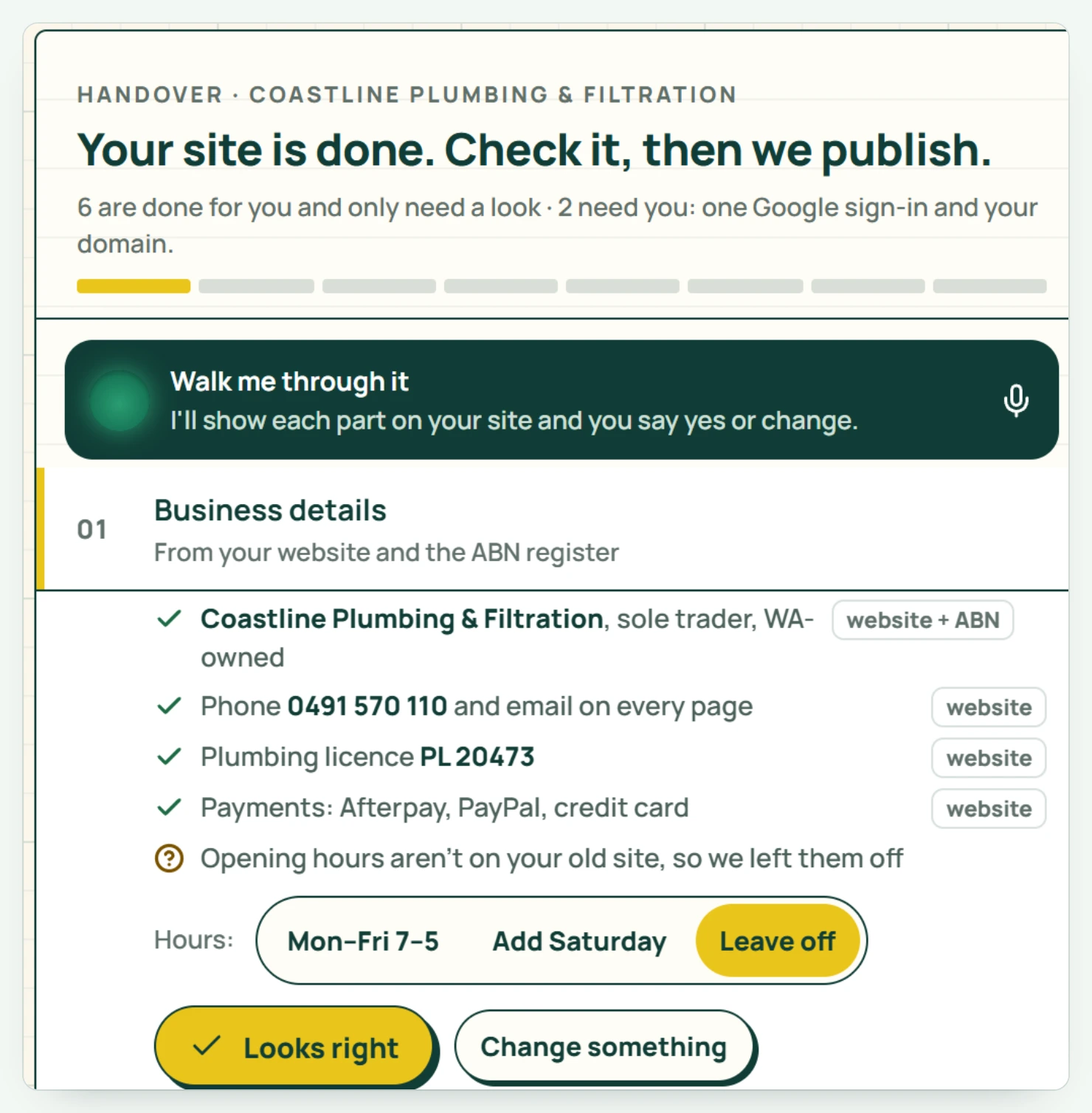
Studio builds your website from your business details, and every page, word and photo is yours to edit.8 So the fact sheet is where your site starts, not something you bolt on afterwards.
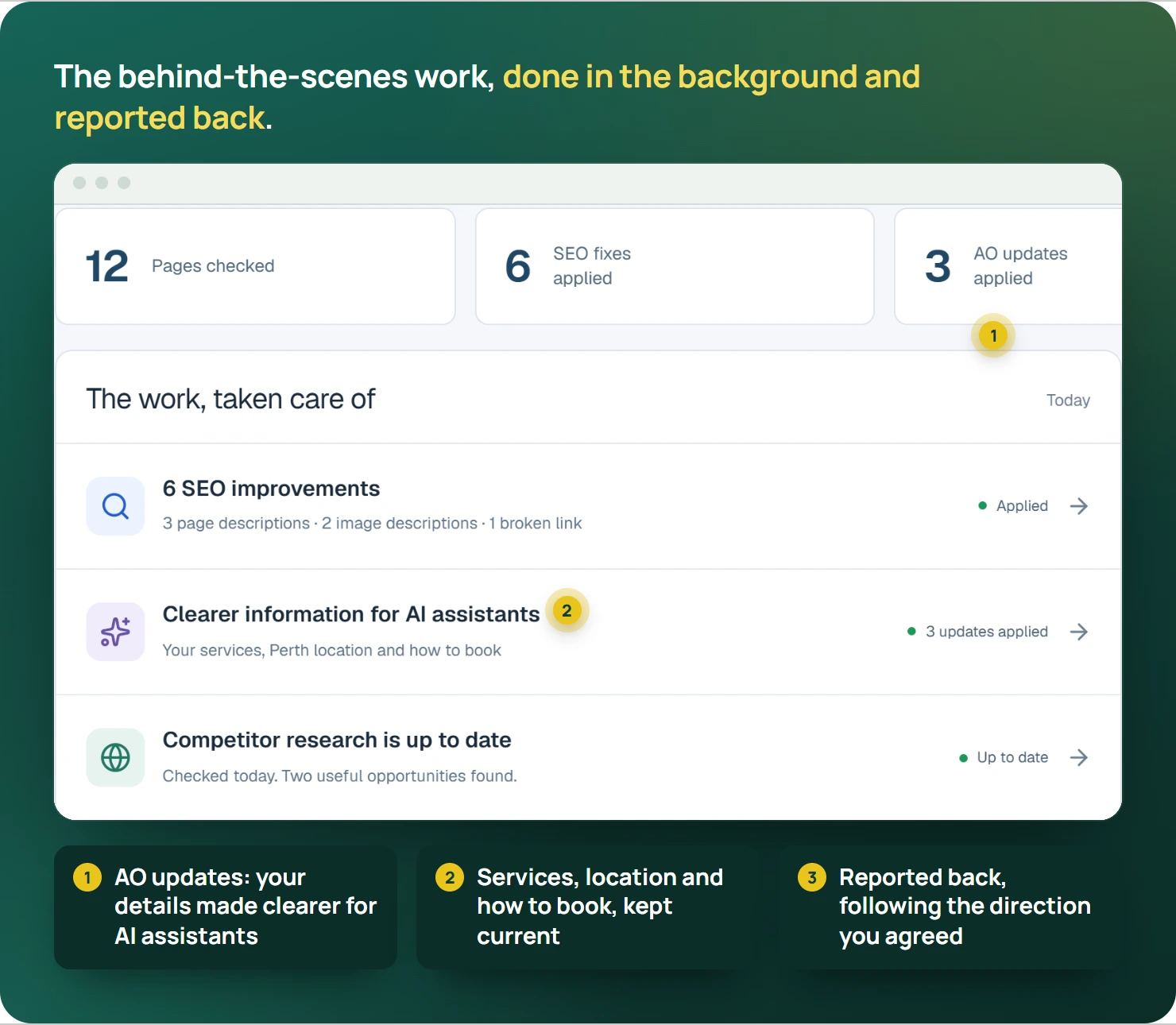
Growth adds SEO, ongoing website checks and SEO improvements, and Agent Optimisation, so AI assistants understand what you do and where.8 That's the behind-the-scenes work this whole article is about, done in the background and reported back, instead of discovered at 2 am.
One honest limit: Studio looks after your website. The Google profile and the old directory listings are logins only you hold, so those fixes are yours.
What's in each plan is on the pricing page.
So how did Faisal go?
One afternoon for the fact sheet and the hunt. One evening fixing the Google profile and the three directories he could still log into. One email to the directory he couldn't, asking them to remove the listing. The structured data was fixed the same week.
A month later, a customer in Stratton said she'd asked an AI assistant for "a local electrician for a switchboard upgrade near Midland" and it had given her Helena Valley Electrical, with the right number, and a note that they don't do after-hours work. She booked for a Tuesday morning. Faisal's wife's phone has been quiet at 2 am ever since.
Your turn
Search for your own old phone number in quote marks tonight. Whatever you find is your to-do list. Our Google Business Profile checklist handles the profile side, and the service-area page guide covers describing where you work.
And if you'd like your website to start from the right facts and stay that way, see what EasyDone Studio builds for your business.
Sources
- support.google.com: Google: Improve your local ranking accessed Saturday 10 October 2026
- support.google.com: Google: Represent your business accurately accessed Saturday 10 October 2026
- support.google.com: Google: Manage service areas accessed Saturday 10 October 2026
- developers.google.com: Google: Local business structured data accessed Saturday 10 October 2026
- developers.google.com: Google: General structured data guidelines accessed Saturday 10 October 2026
- support.google.com: Google: Special opening hours accessed Saturday 10 October 2026
- developers.google.com: Google: Title links accessed Saturday 10 October 2026
- Product documentation: EasyDone Studio: Plan inclusions accessed Saturday 10 October 2026
Researched and written with AI for EasyDone Studio. Every figure links to the source it came from.