
Written by the EasyDone team. Last checked 10 October 2026.
Read Search Console for the searches that bring you work, not for the total. Sort your searches into three baskets (local work you want, readers who will never book, and noise), fix the titles of pages that locals see but don't click, and line the numbers up against your diary of booked jobs. Below is that as your first thirty days, twenty minutes at a time.
The worked example is a made up business. Sonia Hall runs Hall Auto Electrical in O'Connor. Search Console says her site got four thousand clicks from Google last month; her diary says she booked eleven jobs from the website. The business does dual battery systems for 4WDs, alternators, reversing cameras, and a steady line of tradies whose utes have started doing strange things after someone else wired in a light bar. Her best page, by a country mile, is an article her nephew wrote called "How to wire a dual battery system".
Four thousand people a month read it. Almost none of them live anywhere near Fremantle, and every one of them is planning to do the job themselves. That's the trap with Search Console: it shows you traffic, and traffic isn't work.
Day 1: get it set up and leave it alone
If you haven't already, set up Search Console for your website and verify that you own it. Whoever looks after your site can do this in ten minutes. Use your business's own Google account, not your nephew's, so the access stays with the business when the nephew moves to Melbourne.
Then leave it for a week. It needs a little time to collect anything useful, and staring at an empty chart isn't a business activity.
Week 1: learn the four numbers
Open the Performance report. Google describes four numbers at the top:1
| Number | What it means in plain words | What it doesn't tell you |
|---|---|---|
| Impressions | How many times your site showed up in Google's results | Whether anyone noticed |
| Clicks | How many times someone clicked through to your site | Whether they were a customer |
| Click-through rate | Clicks divided by impressions | Whether the clicks were the right people |
| Average position | Roughly where you showed up, on average | Where you show up for any one person, in any one suburb |
Write that last column on a sticky note. Every number in this report is about search, and every question you actually care about is about enquiries. The report gets you halfway. Your diary gets you the rest.
Week 2: sort the searches into three baskets
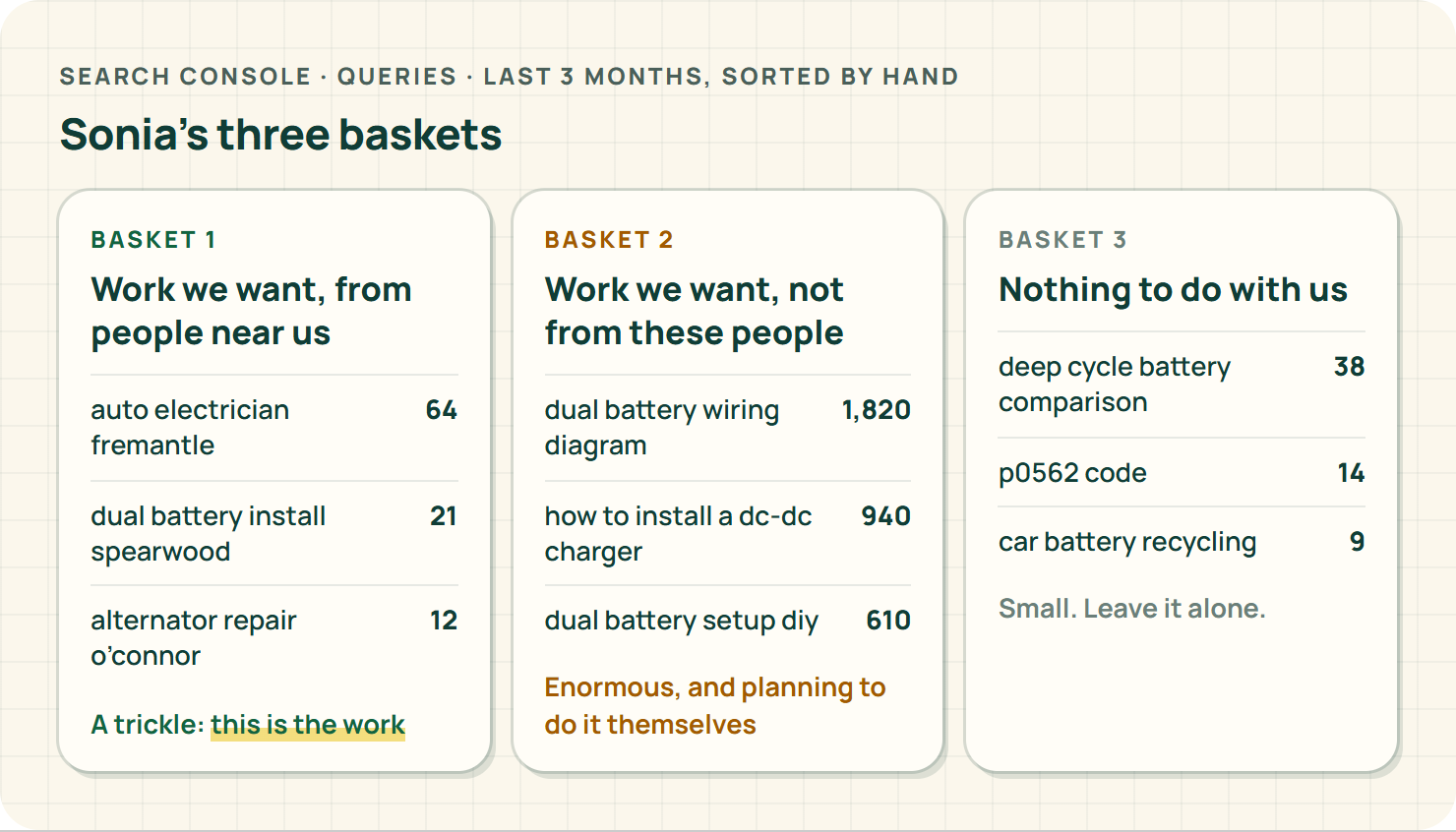
This is the twenty minutes that changes everything. Go to the Queries tab, set the date to the last three months, and sort every search with more than a handful of clicks into three baskets:
- Work we want, from people near us. "Auto electrician Fremantle", "dual battery install Spearwood", "alternator repair O'Connor".
- Work we want, but not from these people. "Dual battery wiring diagram", "how to install a DC-DC charger". Interested in the topic, planning to do it themselves, often in another state.
- Nothing to do with us. Someone searching the name of a battery brand you mentioned once, or a fault code for a car you don't touch.
For Sonia, basket three was small, basket two was enormous, and basket one was a trickle. The graph had been going up because basket two had been going up. That's lovely for her nephew's ego and useless for her diary.
Don't delete the DIY article. It's helpful, and Google's own guidance is to write for people, not for search engines.2 Just stop reading its traffic as a sign the business is growing.
Week 3: fix the page people see but don't click
Now go to the Pages tab and look for a page that shows up a lot for basket-one searches but gets very few clicks. That's usually a page whose title and description don't tell a local customer they've found the right place.
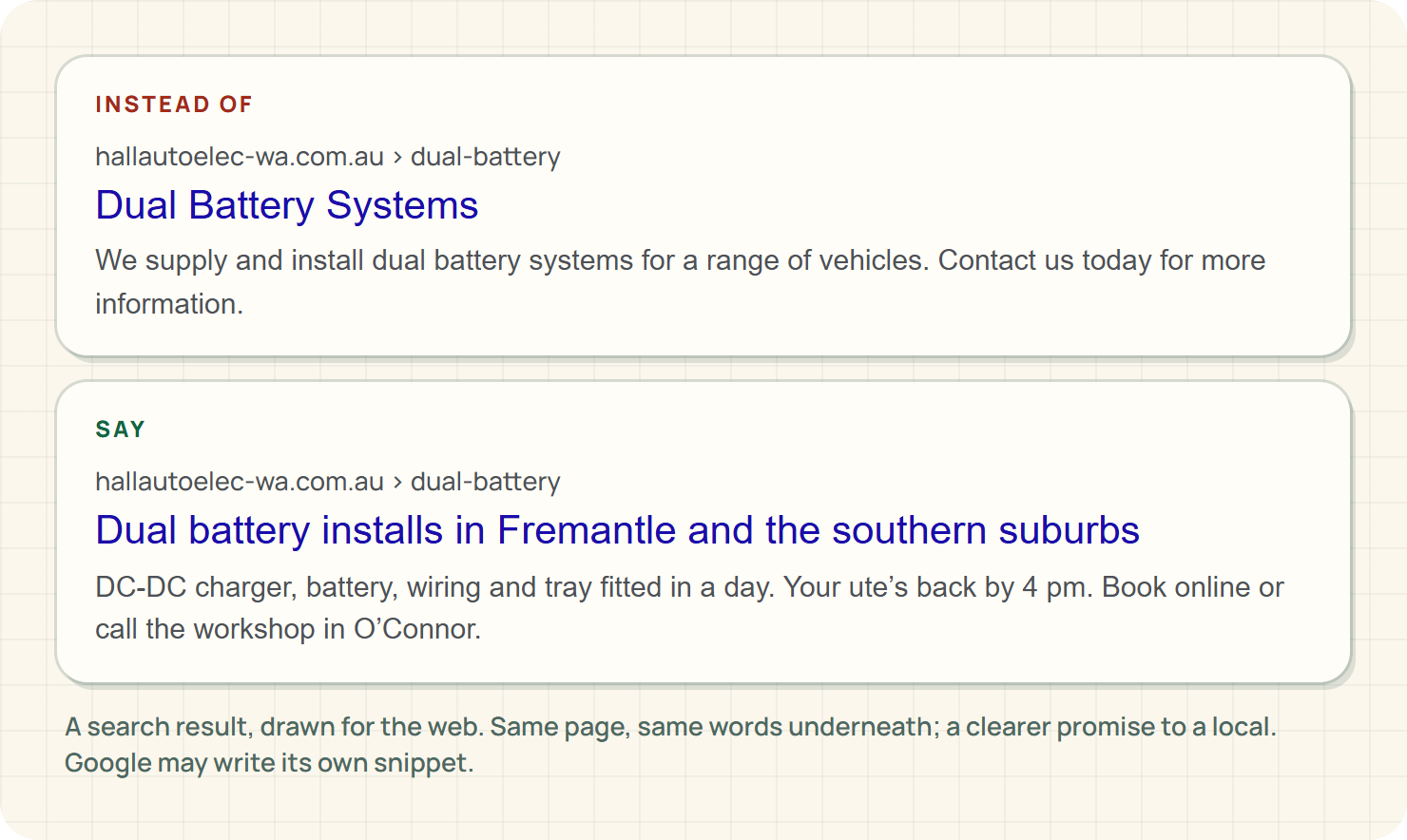
Google explains that title links come from your page title and other text on the page,3 and the snippet underneath may come from your page content or from the description you write.4 So make both say what the page is and who it's for.
Sonia's dual battery service page was titled "Dual Battery Systems". It now says "Dual battery installs in Fremantle and the southern suburbs", and the description says what's included, how long the ute's off the road and how to book. Same page, same words underneath, much clearer promise in the search results.
Change one thing at a time, and write down what you changed and when. Otherwise in a month you won't know which change did what.
Week 4: compare like with like
A month after your change, compare the four weeks after with the four weeks before. Then sanity-check the comparison:
- Did either period include a public holiday or a week you were shut?
- Did you run an ad, get a newspaper mention, or have a customer post about you in a local Facebook group?
- Is it summer, when every 4WD owner in Perth suddenly remembers their Exmouth trip?
If something else changed at the same time, say so in your notes. "Clicks went up after the title change" is a fact. "The title change brought in all the extra work" is a guess.
Month 2: line it up against your diary
This is the bit nobody does, and it's the only bit that pays. Next to your Search Console notes, write down how many website enquiries you got each week, and how many turned into booked jobs.
Ask every new customer how they found you. Write the answer on the job. After two months you'll have a rough picture: which pages bring the calls, which bring the readers, and which bring nobody.
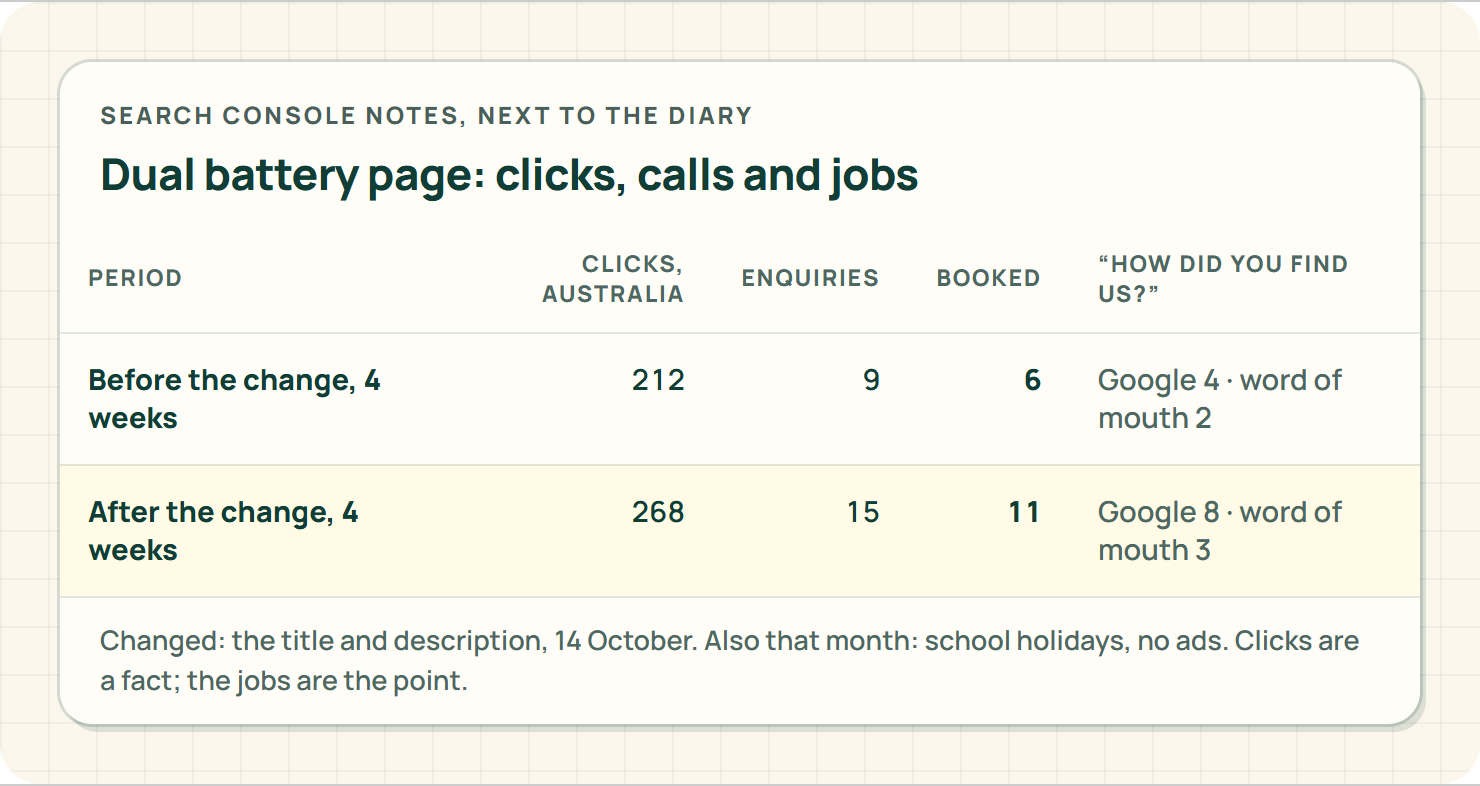
Sonia's picture was clear by Christmas. The dual battery service page, now titled for locals, was bringing in two or three booked installs a week from people heading north for the holidays. The DIY article was still bringing in thousands of readers, and still bringing in almost no work. Both were fine. She just stopped confusing them.
Month 3: three filters worth knowing
By now the report isn't scary, so add three filters that make it far more useful for a local business. All three sit along the top of the Performance report.1
- Country: Australia. Obvious once you see it. Sonia's DIY article was getting a big slice of its clicks from overseas. Filtering to Australia shrank the graph and made it honest.
- Device: mobile. Most local customers find you on a phone. If a page does well on desktop and badly on mobile, that's a clue the phone version isn't doing its job.
- Page: one service page at a time. Click a page, then flip to Queries. Now you're seeing only the searches that brought people to that page, which is the fastest way to find out whether your "alternator repairs" page is attracting people with dead alternators or people researching how alternators work.
One more thing that confuses everyone: the query list won't add up to the total clicks. Google leaves out very rare searches to protect people's privacy, so some of your traffic will always be unlabelled. Don't chase it. The searches that matter to a local business are rarely the one-offs.
What does Search Console tell you about AI answers?
Less than you'd like. Google says that when your site appears in its AI features, like AI Overviews and AI Mode, that activity is counted in your overall web search numbers in Search Console.5 It isn't reported separately. So you can't open Search Console and see "how often an AI answer mentioned us".
Treat anyone who says they can measure that precisely with a raised eyebrow. What you can do is make sure the pages AI features draw on are clear, accurate and helpful, which is exactly the work you've just done for Google's ordinary results.
And local results?
Search Console is about your website. Your spot in the map results is a separate thing: Google says local ranking comes down to relevance, distance and prominence,6 and your Business Profile has its own performance numbers. Look at both, but don't expect one report to explain the other.
Where EasyDone Studio comes in
Studio is our product, so here's the pitch, kept to what it actually does.
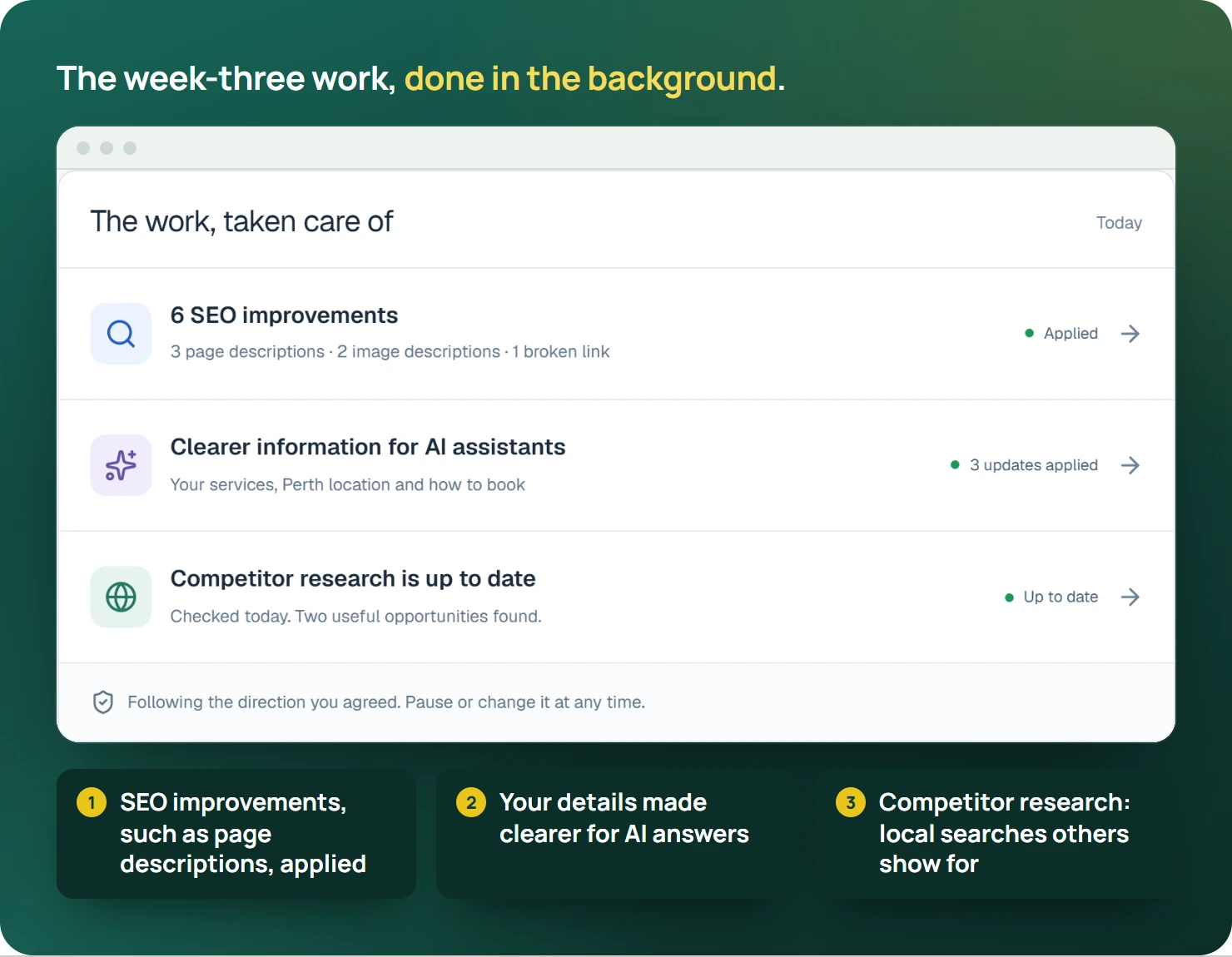
Growth adds SEO, ongoing website checks and SEO improvements, and competitor research for search.7 In plain words, the week-three work, finding pages that show up but don't get the click and making their titles and descriptions clearer, is the kind of job Studio does in the background instead of waiting for you to find a spare Tuesday night. The competitor research shows which local searches other auto electricians are turning up for that you aren't.
Website Plus adds AI rewriting of your existing pages,7 which is handy when a page needs to talk to locals instead of hobbyists.
One honest limit: Search Console and its data are Google's. Studio works on your website; the Search Console account itself stays yours.
Plans and prices are on the pricing page.
Your turn
Open Search Console tonight, go to Queries, and sort the top twenty searches into the three baskets. If basket one is a trickle, you've found your next job. Our monthly local search check gives that twenty minutes a home on the calendar, and the AI visibility guide covers what to track beyond Google.
Or see what EasyDone Studio builds for your business, and spend your Tuesday nights on something better than graphs.
Sources
- support.google.com: Google: Search Console performance accessed Saturday 10 October 2026
- developers.google.com: Google: Helpful, reliable content accessed Saturday 10 October 2026
- developers.google.com: Google: Title links accessed Saturday 10 October 2026
- developers.google.com: Google: Search snippets accessed Saturday 10 October 2026
- developers.google.com: Google: AI features and your website accessed Saturday 10 October 2026
- support.google.com: Google: Improve your local ranking accessed Saturday 10 October 2026
- Product documentation: EasyDone Studio: Plan inclusions accessed Saturday 10 October 2026
Researched and written with AI for EasyDone Studio. Every figure links to the source it came from.